

Best Monitor Arms for Home & Office Use in the UK | 2025 Buyer's Guide
Whether you're setting up a dedicated home office or optimising your workplace desk, choosing the right monitor arm can transform your daily working experience. Poor monitor positioning is one of the most common culprits behind back pain, neck tension, and eye strain among British office workers—issues that have become increasingly prevalent as more professionals embrace flexible working arrangements. A quality monitor arm doesn't just improve comfort; it reclaims valuable desk space, reduces cable clutter, and allows you to position your screen at the perfect viewing angle for your individual needs. From compact single-monitor solutions ideal for studio flats to robust dual-mount systems for power users, today's market offers impressive variety at every price point. This guide walks you through five outstanding monitor arm options that combine practical functionality with thoughtful design, helping you find the solution that suits your workspace, whether that's a corner of your bedroom, a dedicated study, or a shared office environment.
Inception's AI took the time to understand this market in the UK · · How we pickWe may earn a commission on purchases. It never affects our rankings.
Top Picks Summary
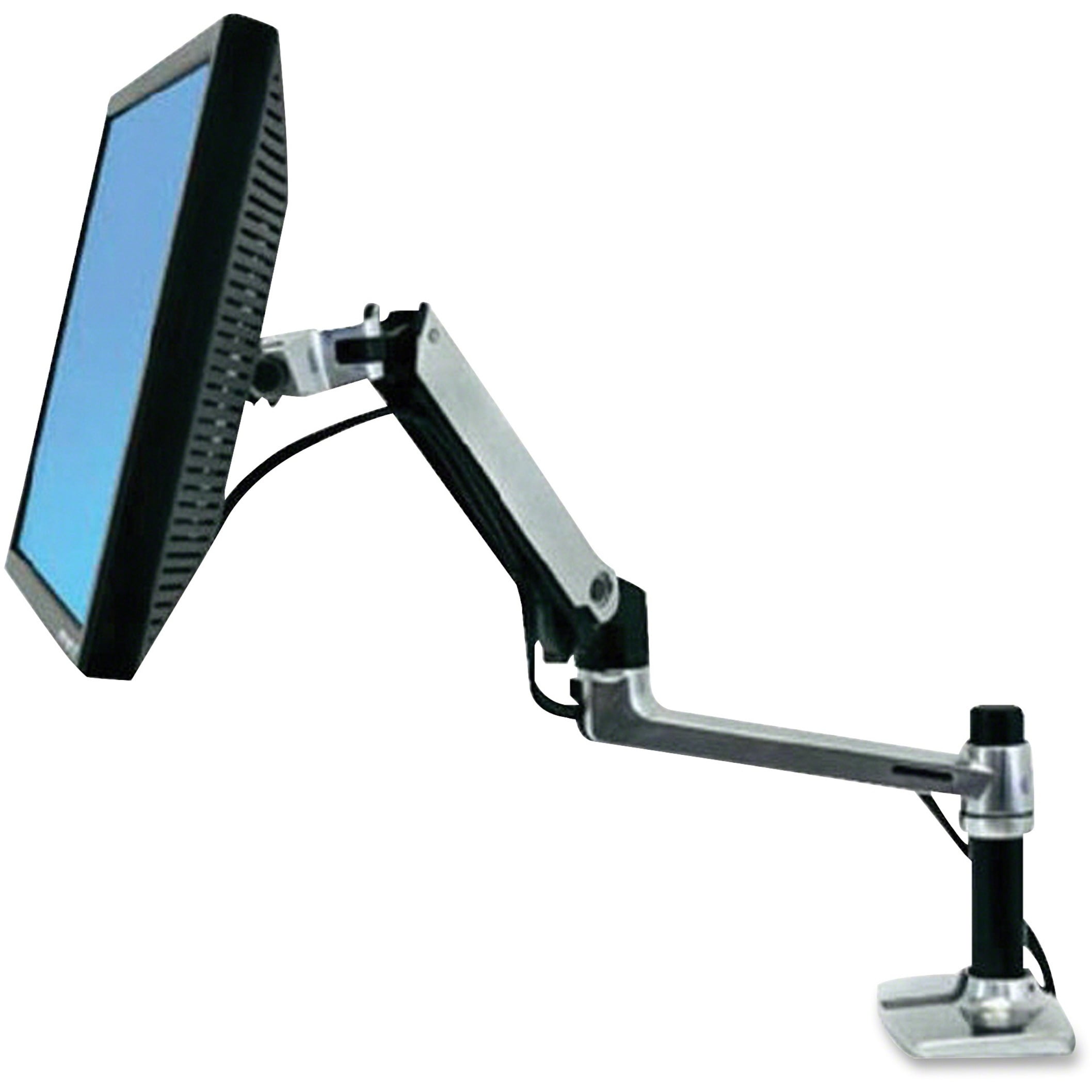
Ergotron LX Desk Mount LCD Arm
Ergotron's LX Desk Mount is the market leader for UK buyers who prioritise build quality and long-term reliability; its gas-spring mechanism and wide height/tilt range deliver the smoothest, most precise adjustments in this list. It carries a higher price than the budget alternatives like Amazon Basics and HUANUO but justifies that premium with superior materials, greater weight capacity and a longer warranty, making it the best choice for heavier monitors and professional setups.
Amazon Basics Single Monitor Stand
The Amazon Basics Single Monitor Stand is the budget champion in the 2025 UK market, offering a simple, dependable mounting solution at a significantly lower price point than premium arms. While it lacks the refined gas-spring motion and heavy-duty capacity of the Ergotron LX or some Duronic and Invision models, its affordability and wide availability make it an excellent entry-level option for home offices and light monitors.

We may earn a commission on purchases. It never affects our rankings.
Estimated£25 – £45
Duronic DM251X1 Monitor Arm
Duronic's DM251X1 strikes a strong balance between cost and functionality for UK customers, providing robust adjustability and solid construction at a mid-market price that undercuts the Ergotron while outperforming basic stands on ergonomics. As a UK-distributed product, it often comes with faster local support and straightforward warranty service compared with some imported brands like HUANUO, making it a practical choice for buyers wanting value without sacrificing durability.
Estimated£35 – £60
Huanuo Single Monitor Arm
HUANUO offers a competitively priced single monitor arm that brings modern features such as integrated cable management and easy gas-spring adjustments, delivering strong value compared with similarly priced Duronic or Invision options. It typically undercuts premium names on cost while matching many technical conveniences, but buyers should weigh slightly variable finish quality and warranty terms against the clear price advantage.

Invision MX150 Monitor Arm
The Invision MX150 is positioned as a stylish mid-to-high-range arm for UK offices, combining a refined aesthetic and reliable ergonomics that sit between the budget HUANUO/Amazon Basics and the top-tier Ergotron. It offers competitive technical specs and a favourable price-performance balance versus the Ergotron LX, making it an attractive option for buyers who want near-premium functionality without the highest premium price.

We may earn a commission on purchases. It never affects our rankings.
Estimated£80 – £120
These five monitor arms have been selected for their reliability, adjustment range, and value for money in the British market. Each offers distinct advantages whether you prioritise minimal desk footprint, maximum flexibility, budget-conscious purchasing, or premium build quality. All models feature smooth height and tilt adjustment, with several offering full rotation and swivel capabilities.
Understanding Monitor Arm Specifications
When evaluating monitor arms, several technical specifications deserve your attention. VESA compatibility indicates which monitor types will mount securely—most modern displays use 75mm or 100mm patterns. Weight capacity matters significantly; oversized gaming monitors or dual setups require arms rated for 10kg or more. Arm reach determines how far your display can extend from the desk edge, whilst articulation points control movement range. British workplaces increasingly reference HSE (Health and Safety Executive) guidance on workstation setup, which emphasises screen positioning slightly below eye level and approximately arm's length away.
VESA mounting compatibility (75mm and 100mm standards)
Weight capacity suitable for your monitor size and type
Articulation points for tilt, swivel, and height adjustment
Desk clamp or grommet mounting options
Cable management systems to reduce desk clutter
Reach distance appropriate for your desk depth
Rotation capabilities for portrait or landscape orientation
Smooth adjustment mechanisms with minimal effort required
Frequently Asked Questions
Which monitor arm should I buy for home office reliability?
Choose the Ergotron LX Desk Mount LCD Arm if you want long-term reliability: it uses a smooth gas-spring mechanism for most 13–32" monitors up to ~9 kg, with VESA 75/100 compatibility and an average rating of 4.8.
What adjustment range does the Ergotron LX provide?
The Ergotron LX Desk Mount LCD Arm has a gas-spring mechanism and “wide height/tilt range”, supporting most 13–32" monitors up to ~9 kg, with integrated cable management and VESA 75/100 compatibility (4.7 rating).
Is the Amazon Basics single monitor stand cheaper than Duronic DM251X1?
The provided data doesn’t include prices for the Amazon Basics Single Monitor Stand or the Duronic DM251X1 Monitor Arm, so I can’t compare value by cost; I can only confirm ratings of 4.0 and 4.0 respectively.
Will Duronic DM251X1 work with my VESA 75 or VESA 100 mount?
Yes—Duronic DM251X1 Monitor Arm is compatible with VESA 75/100 mounts and supports a wide range of monitor sizes and weights, with a solid steel gas-spring assist for height adjustment and a 4 rating.
Conclusion
Selecting an appropriate monitor arm is ultimately about investing in your comfort and productivity—two things that shouldn't be compromised. The options featured here represent different approaches to the same challenge: achieving an ergonomically sound workspace that supports your wellbeing throughout the working day. Before making your final decision, consider your desk dimensions, monitor weight, and how much adjustment flexibility you'll actually need. Many people find that a modest investment in a quality arm pays dividends within the first few weeks of use, reducing fatigue and improving focus. Take time to review the specific features of each option and match them against your particular requirements. If you'd like more detailed comparisons or have questions about specific models, our search functionality can help you explore additional information. Your ideal monitor setup is closer than you might think.