

Multicam Editing Workstations - Top 8 in the UK for 2026
Multicam editing workstations are purpose-built systems optimized for editing, colour grading and live-switching multi-camera footage. In the UK market they serve broadcasters, production houses, wedding and event videographers, streamers and independent creators who need reliable real-time playback, precise multicam synchronization and fast export times. Modern preferences favour powerful GPUs for hardware-accelerated codecs, multi-core CPUs for timeline responsiveness, large amounts of RAM for multi-stream playback, NVMe storage for high-bandwidth media, and professional I/O such as SDI and Thunderbolt for camera and recorder connections. UK buyers also value local support, warranty, quiet operation for studio use, and compatibility with industry software like DaVinci Resolve, Adobe Premiere Pro, Avid and Blackmagic tools. Environmental concerns and total cost of ownership are increasingly important, so many buyers compare prebuilt systems, custom builds and rental options before deciding.
Inception's AI took the time to understand this market in the UK · We may earn a commission on purchases. It never affects our rankings.
Top Picks Summary
Apple Mac Studio M2 Ultra
The Mac Studio M2 Ultra is a compact, best-in-class multicam editing workstation that combines a very high‑core GPU and up to 192GB of unified memory to deliver fluid real‑time timelines in Final Cut Pro and other macOS apps. It outpaces many tower systems on single‑node, codec‑accelerated playback and energy efficiency, offering a stronger price‑to‑performance ratio than a Mac Pro for studios that don’t need many internal PCIe slots. Compared with the Windows towers on this list it trades raw expandability for lower total cost of ownership, quieter operation, and excellent hardware/software integration for multicam workflows.

Where to buy Apple Mac Studio M2 Ultra in UK: we track one retailer, Apple, and show the price we last observed there; the price you see at checkout may differ.
We may earn a commission on purchases. It never affects our rankings.
£4,000 – £6,500
Apple Mac Pro M2 Ultra
The Mac Pro with M2 Ultra represents the market leader for macOS-based multicam production where maximum sustained performance and professional I/O matter, providing superior thermal headroom and modular expansion compared with the Mac Studio. While it carries a premium price, it is worth the cost for facilities that need greater internal bandwidth, rack/workflow integration, and Apple ecosystem certification for large multicam projects. Compared to the Windows towers here it is less flexible for third‑party GPU add‑ins but offers the most seamless Final Cut Pro experience and long‑term Apple support.

HP Z8 Fury G5 Workstation
HP’s Z8 Fury G5 is a heavyweight, highly expandable multicam workstation built around a single Intel Xeon W-3400 (Sapphire Rapids) CPU with up to 56 cores, large ECC RAM pools and support for up to four GPUs—ideal for editing many synchronized camera streams and high-bitrate codecs. It delivers stronger raw expansion and multi-GPU CUDA/RT acceleration than the Apple systems, making it attractive for studios relying on NVIDIA acceleration and rack-scale workflows. Compared with the compact machines on this list, the Z8 Fury’s 4-GPU capacity and abundant PCIe lanes provide the most headroom for parallel encoding/decoding and sustained throughput in heavy multicam projects.

Where to buy HP Z8 Fury G5 Workstation in UK: we track one retailer, HP, and show the price we last observed there; the price you see at checkout may differ.
We may earn a commission on purchases. It never affects our rankings.
£3,500 – £12,000
Dell Precision 7875 Tower
The Dell Precision 7875 Tower balances high core counts and workstation durability—often configured with AMD Threadripper Pro—to offer excellent multithreaded performance for simultaneous multicam transcodes and timeline scrubbing. It is competitively priced relative to other enterprise towers and benefits from Dell’s ISV certifications and enterprise support, which reduces downtime in production environments. Versus the Z8 or Mac Pro it delivers strong single‑socket price‑to‑performance and easier configuration for GPU‑heavy editing suites.

Where to buy Dell Precision 7875 Tower in UK: we track one retailer, Dell, and show the price we last observed there; the price you see at checkout may differ.
We may earn a commission on purchases. It never affects our rankings.
£4,109.18GBP
Lenovo ThinkStation P620
The ThinkStation P620 is a single‑socket Threadripper Pro workstation optimized for multicam editors who want very high core counts without the complexity of dual‑CPU systems, making it a cost‑efficient choice for studios that need raw CPU threads and abundant PCIe lanes. It offers a sweet spot of performance, reliability and quieter operation compared with larger dual‑socket towers, while giving better out‑of‑the‑box compatibility for many pro GPU cards than compact Macs. Financially it undercuts many top‑end dual‑socket workstations while delivering the compute needed for multi‑stream effects and exports.

Scan 3XS Media Workstation
Scan’s 3XS Media Workstation is a UK‑built, custom‑tuned system aimed at demanding multicam facilities; configurations commonly pair high‑end NVIDIA GPUs, NVMe RAID storage and factory‑tested codecs for turnkey performance. As a specialist builder, Scan provides tailored I/O and cooling choices that often outperform comparable off‑the‑shelf choices on a cost‑per‑stream basis, and they can optimize builds for Premiere Pro, DaVinci Resolve or Avid pipelines. Compared with mass‑market vendors, Scan’s value is in bespoke configurability and hands‑on support for media‑centric workflows.
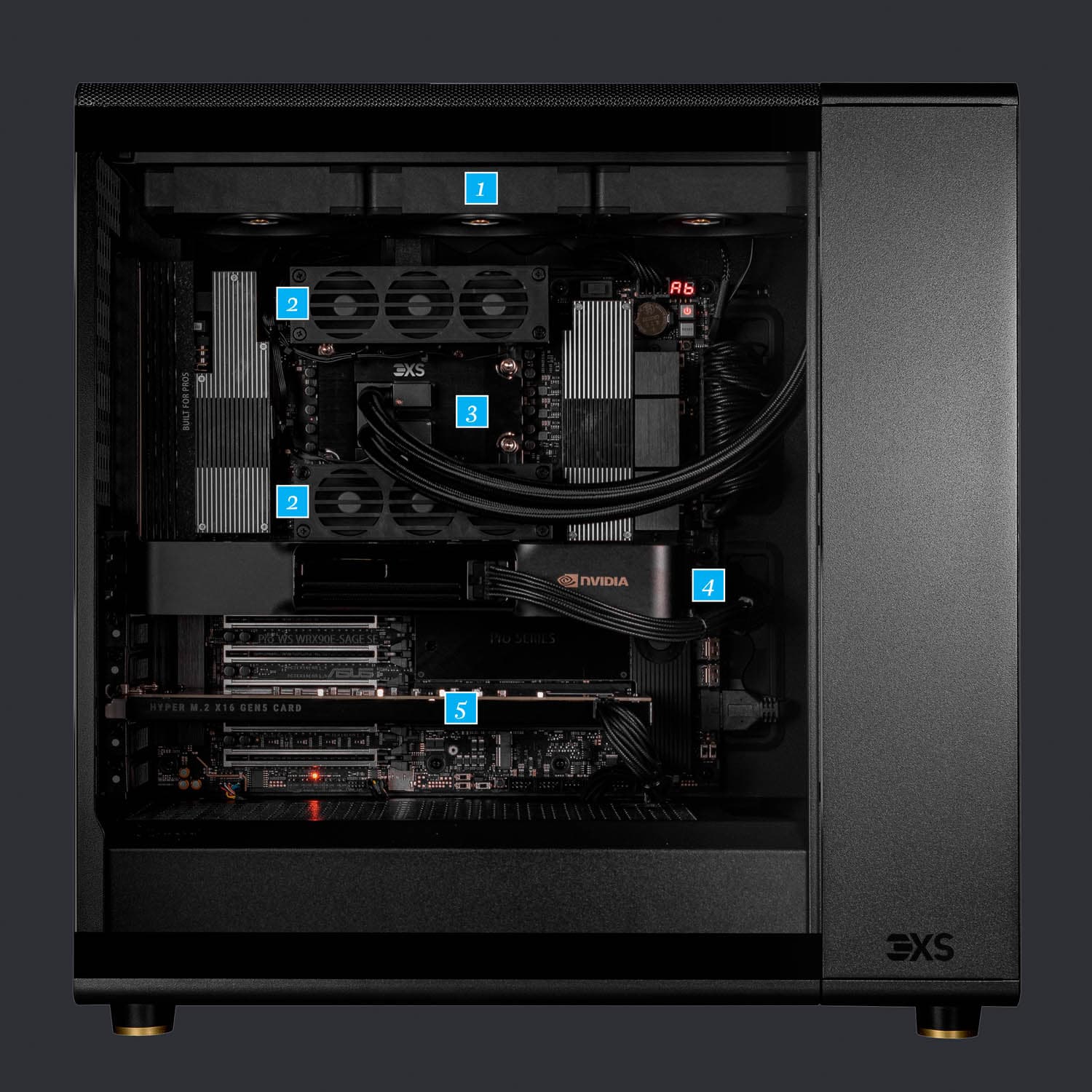
Where to buy Scan 3XS Media Workstation in UK: we track one retailer, Scan, and show the price we last observed there; the price you see at checkout may differ.
We may earn a commission on purchases. It never affects our rankings.
£2,800 – £12,000
PC Specialist Vortex GR Pro
The PC Specialist Vortex GR Pro is a high‑value, custom desktop aimed at freelance editors and small studios needing robust multicam playback without enterprise premiums—typically shipping with consumer or prosumer GPUs and fast NVMe storage. It delivers strong bang‑for‑buck compared with branded enterprise towers by prioritizing core CPU/GPU choices and storage speed, though it lacks wide ISV certification and some rack/workstation features. For teams on a budget the Vortex GR Pro is a pragmatic way to scale stream counts and encoding throughput affordably.

ASUS ProArt Station PD5
The ASUS ProArt Station PD5 is a compact, creator‑focused workstation that offers reliable multicam editing performance with good thermal engineering, strong I/O and often optional Thunderbolt connectivity for fast capture devices. It is more affordable and space‑efficient than full towers while still supporting professional GPUs and fast NVMe arrays, making it a smart choice for solo editors and small edit bays. Compared to the larger, more expensive workstations on this list, the PD5 trades some expandability for a lower upfront cost and a studio‑friendly footprint.

Where to buy ASUS ProArt Station PD5 in UK: we track one retailer, Asus, and show the price we last observed there; the price you see at checkout may differ.
We may earn a commission on purchases. It never affects our rankings.
£1,100 – £3,200
Research and evidence: why dedicated multicam workstations help
Benchmarks, industry testing and ergonomics research collectively support the benefits of dedicated multicam editing workstations. Laboratory and industry benchmark data show that hardware acceleration, high-speed storage and balanced CPU-GPU configurations materially improve playback and export performance. Human factors research into workstation design also demonstrates that quieter, well-arranged systems reduce operator fatigue during long edits and live productions. The following bullet points summarise the practical, research-backed benefits in plain language.
Hardware acceleration: Industry benchmarks and hardware tests consistently show that GPUs with codec acceleration (HEVC, ProRes, AV1 where supported) reduce rendering and export times compared with CPU-only workflows, and improve real-time multicam playback.
Multi-core scaling: Tests from hardware labs and software vendors indicate modern NLEs scale across many CPU cores for background tasks and certain effects, improving throughput for large multicam sequences.
High-speed storage: SSD and NVMe performance testing shows much higher sustained read/write bandwidth than SATA drives, reducing timeline stutter and speeding media ingest and conform operations.
RAM and cache: Systems with abundant RAM reduce swapping to disk when handling many camera streams, improving timeline responsiveness and preview stability.
I/O and connectivity: Professional I/O (SDI, Thunderbolt, 10GbE) and low-latency audio interfaces lower the risk of dropped frames and sync problems during live-switch and multi-camera recording workflows.
Ergonomics and user studies: Research into workspace ergonomics finds that quieter, thermally efficient workstations and organised cabling reduce operator stress and errors during long editing sessions.
Frequently Asked Questions
Which workstation is best for professional studios needing modular expansion?
The Apple Mac Pro M2 Ultra is the ideal choice for professional studios because it offers a modular tower design with extensive PCIe expansion for capture and I/O cards, earning it a 4.7 rating.
How many CPU cores does the HP Z8 Fury G5 support?
The HP Z8 Fury G5 supports up to 56 cores using a single-socket Intel Xeon W-3400 processor, which is designed for handling the heaviest multicam transcodes and batch renders.
Is the Apple Mac Studio M2 Ultra worth the investment for 4K editing?
The Apple Mac Studio M2 Ultra is a highly capable workstation for 4K workflows, featuring unified memory up to 192GB and configurable SSDs up to 8TB to handle large multi-layer projects efficiently.
Does the Apple Mac Pro M2 Ultra support hardware acceleration for video?
Yes, the Apple Mac Pro M2 Ultra includes hardware acceleration for multi-stream H.264 and H.265 decoding, which is specifically optimised for Final Cut Pro and macOS environments.
Conclusion
This page focuses on multicam editing workstations for the UK market in 2026. The systems above span compact Apple and ASUS desktops, single-socket Threadripper and Xeon towers, and bespoke UK builds, covering budgets from roughly £1,100 to £20,000. If you did not find what you were looking for, try refining or expanding your search terms, adjust filters for brand, budget, or use case, or use the site search to explore rental, custom build and software-optimised options.