

Top 5 DisplayPort-over-Ethernet Extenders in the UK — 2026 buyer’s guide
DisplayPort-over-Ethernet extenders move high-resolution video and multichannel audio across ordinary Cat5e/Cat6 cabling, which matters in UK homes, offices and venues where the source and the screen sit far apart — a projector at the back of a converted Victorian terrace, signage across a retail park, a boardroom display in a London office. Two things are worth knowing before you spend, because most listings gloss over both. First, almost every box sold as a “DisplayPort over Ethernet” extender is point-to-point: a transmitter and a receiver joined by one dedicated Cat6 run. It uses Ethernet cable, not Ethernet networking. You cannot plug it into a LAN switch and route it to any room unless the product explicitly says AV-over-IP. Second, DisplayPort is far less forgiving than HDMI over long runs. The display drives a 3.3V Hot Plug Detect line that the source watches continuously, and if that line dips the link retrains — which on a PC can rearrange your desktop windows. That is why DP extenders lean on EDID emulation, and why standalone DisplayPort hotplug maintainers exist as products in their own right. Be clear-eyed about the shortlist below. Four of the five picks — the OREI UltraAV, the J-Tech Digital HDMI Over IP Extender, the StarTech.com ST121HDBTE and the ATEN VE814 — are HDMI or HDBaseT extenders. They will serve a DisplayPort source only with an active DP-to-HDMI adapter at the transmitter, and that adapter then sets your real resolution and refresh ceiling and drops DP-only features such as MST daisy-chaining. The TESmart DisplayPort KVM Extender Over Cat6 is the single entry here listed for a native DisplayPort workflow; TESmart’s published extender range is otherwise HDMI-based, so confirm on the manufacturer’s own datasheet that your exact model takes DisplayPort in and DisplayPort out before ordering.
Inception's AI took the time to understand this market in the UK · · How we pickWe may earn a commission on purchases. It never affects our rankings.
Top Picks Summary
OREI UltraAV HDMI Over Ethernet Extender 4K 60Hz
The OREI UltraAV HDMI Over Ethernet Extender 4K 60Hz earns a spot for UK deployments thanks to its balance of low-latency 4K60 performance and budget-friendly pricing, making it a reliable choice for single-room and small multi-room installs. Compared with the networked J-Tech and premium ATEN systems, OREI is a cost-efficient point-to-point option that installers can quickly deploy and maintain; used with an active DisplayPort-to-HDMI adapter it provides a practical path for a DP source without the expense of native DP extenders, at the cost of DP-only features such as MST.

J-Tech Digital HDMI Over IP Extender 4K
J-Tech Digital's HDMI Over IP Extender 4K stands out for scalability and features tailored to larger distributed AV systems in the UK, offering multicast/matrixing and web-based management that make it easier to manage many endpoints than simpler point-to-point units. Technically more flexible than the OREI and StarTech point-to-point extenders, J-Tech carries a higher upfront cost but delivers better network-level control and future-proofing for complex DisplayPort-to-HDMI conversions or mixed-signal deployments.

Estimated£150 – £300
TESmart DisplayPort KVM Extender Over Cat6
TESmart’s DisplayPort KVM Extender Over Cat6 is the only entry on this page listed for a native DisplayPort workflow, pairing DP video extension with integrated KVM and USB peripheral support so a workstation can sit in a rack while the operator works elsewhere. That removes the DP-to-HDMI adapter every other pick here requires, along with the resolution ceiling the adapter would impose. Before ordering, confirm on TESmart’s own datasheet that your exact model takes DisplayPort in and DisplayPort out, and what resolution and refresh it holds at your actual run length — TESmart’s published extender range is otherwise HDMI-based, and its long-distance dual-4K60 workstation kit uses DisplayLink over USB rather than native DP.

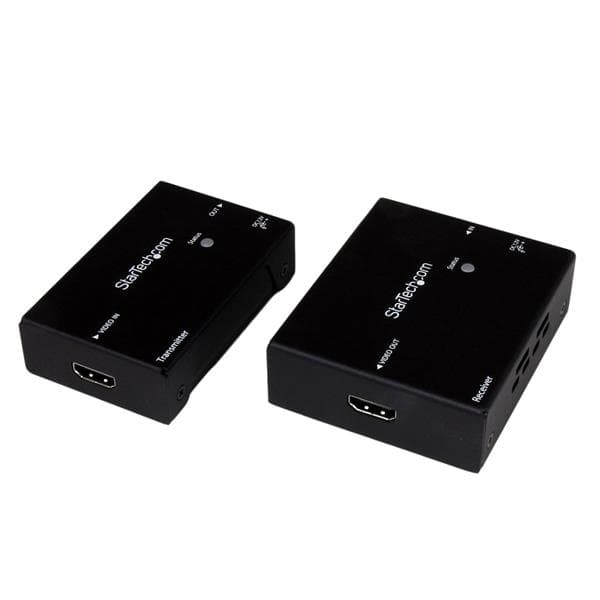
StarTech.com ST121HDBTE HDMI Over Cat5 Extender
StarTech.com's ST121HDBTE HDMI Over Cat5 Extender is a compact, professional-grade option prized in the UK for its reliability, easy installation and strong local support, making it a sensible low-cost choice for single runs or retrofits where DisplayPort sources can be adapted to HDMI. Compared with more feature-rich solutions such as J-Tech or ATEN, StarTech focuses on predictable performance and channel-level warranty and tech support that reduce total cost of ownership for straightforward point-to-point DisplayPort-over-Ethernet conversions.
Estimated£200 – £350
ATEN VE814 HDMI HDBaseT Extender
ATEN’s VE814 HDMI HDBaseT Extender is positioned as the enterprise-grade choice for UK AV integrators due to its robust HDBaseT implementation, long-distance performance, and integration options with ATEN’s broader KVM and matrix ecosystems. Although it carries a premium compared with the simpler OREI or StarTech units, ATEN delivers advanced features (long reach, PoH/power options and industrial reliability) that reduce lifecycle costs in demanding installations — noting that a DisplayPort source reaches it through a DP-to-HDMI adapter, not natively.

Top features to weigh: native 4K60 HDR support, confirmed HDCP/EDID handling, maximum distance in metres over CAT5e/CAT6, latency (ms), KVM/USB support, PoE or external power options, rackmountability and available UK warranty/technical support.
How DisplayPort Over Ethernet Extenders Actually Work
The name is misleading, and the misunderstanding costs people money. These devices send video down twisted-pair copper of the sort used for Ethernet; most of them do not speak Ethernet at all. Here is what separates the categories, and what DisplayPort specifically demands that HDMI does not.
1. Point-to-point, not networked: the great majority of “over Ethernet” extenders are a transmitter/receiver pair needing one dedicated Cat5e/Cat6 run between them. They will not pass through a LAN switch or router.
2. AV-over-IP is the exception: products that explicitly advertise unicast/multicast routing, such as HDMI-over-IP encoders, do ride a managed network and scale to many endpoints — at the cost of network configuration and VLAN planning.
3. DisplayPort is not hot-plug tolerant the way HDMI is: the display drives a Hot Plug Detect line the source monitors continuously, so a marginal long run can force link retraining and shuffle desktop windows. EDID emulation in the extender is what suppresses this.
4. Distance and resolution trade off against each other: a headline metre figure is usually quoted at a lower resolution than the headline resolution. Check the manufacturer’s distance-versus-resolution table, not the box.
5. HDBaseT is a defined standard, proprietary schemes are not: HDBaseT units from different makers are broadly interoperable, whereas proprietary transmitter/receiver pairs must be bought and replaced together.
6. Power is not a given at both ends: some kits power the receiver over the link cable, others need mains at both ends — which changes what has to be installed behind a wall-mounted display.
7. Native DisplayPort extension is rarer than the search term suggests: many results are HDMI extenders, DP-to-HDMI converters or plain DP cables. Verify the unit has a DisplayPort connector at both transmitter and receiver.
Frequently Asked Questions
Can I run these extenders through my existing network switch?
Only the J-Tech Digital HDMI Over IP Extender 4K is built for that — it uses unicast/multicast IP routing and expects a managed, VLAN-capable network. The other four picks (OREI UltraAV, TESmart, StarTech.com ST121HDBTE, ATEN VE814) are point-to-point: the transmitter and receiver need one dedicated Cat5e/Cat6 run between them and will not work through a LAN switch or router. This is the most common and most expensive mistake buyers make with “over Ethernet” extenders — they use Ethernet cable, not Ethernet networking.
Which extender should I buy for a control room setup?
The TESmart DisplayPort KVM Extender Over Cat6 is the only pick here listed for a native DisplayPort workflow, and it pairs DP video with USB KVM so the workstation can live in a rack while keyboard, mouse and screen stay at the desk; it is rated 4.2/5. Confirm on TESmart’s own datasheet that your exact model has DisplayPort at both ends — the rest of TESmart’s published extender range is HDMI-based, and its long-distance dual-4K60 workstation kit uses DisplayLink over USB rather than native DisplayPort.
Does the OREI UltraAV HDMI extender support 4K at 60Hz?
It is sold as a 4K@60Hz extender over Cat5e/Cat6 and is rated 4.3/5, but note what it carries: HDMI, not DisplayPort. A DisplayPort source needs an active DP-to-HDMI adapter at the transmitter, and from that point the adapter — not the extender — sets your real resolution and refresh ceiling. Check the adapter’s own 4K60 rating, and expect the distance figure to be quoted at a lower resolution than the headline one.
Is the J-Tech HDMI over IP extender worth the price?
We don’t publish a live price for it, so check the retailer link for today’s figure. What it buys is different in kind from the others: it distributes over a network with unicast/multicast routing, so one source can reach many endpoints and endpoints can be added later. It is rated 4.4/5. That premium is worth paying only if you genuinely need multi-endpoint or matrix distribution — a single long run to one screen is cheaper and simpler served by a point-to-point HDBaseT extender.
Conclusion
Choosing an extender for a UK project comes down to three questions, in this order. Does the run have its own dedicated Cat6 cable, or does it have to share a network? Only a genuine AV-over-IP product — here, the J-Tech Digital unit — can ride a managed switch; the point-to-point HDBaseT boxes need their own cable end to end. Is your source truly DisplayPort, and does it need to stay DisplayPort? If a DP-to-HDMI adapter is acceptable, the HDBaseT picks from StarTech.com and ATEN are the well-supported, predictable route. And how long is the run in metres, measured along the actual cable path rather than across the room — resolution ceilings fall as distance rises, so a unit rated 4K at 70m may only manage 1080p at its full advertised reach.
Then check the practical UK details that decide whether an install goes smoothly: whether the kit needs mains power at both ends or powers the receiver over the cable, whether the plugs and PSUs are UK-spec, what the warranty and local technical support look like, and whether your installer is pulling CAT5e or CAT6 (for very long or electrically noisy runs, fibre is often the better answer than either). Use the product links to confirm current UK retail prices and return policies before buying, and for anything permanent and in-wall, get an integrator to survey the route first.