Best Mobile Workstations UK 2026: Top 4 Professional Laptops
Published on Tuesday, 27 January 2026
Mobile workstations are high-performance laptops built for professionals who need desktop-class computing on the move. In the UK market for 2026, these systems combine powerful CPUs and workstation-class GPUs, professional ISV certifications, enhanced cooling, long battery life, and robust security features. They appeal to engineers, architects, video editors, data scientists and other specialists who value reliability, precision and support. UK buyers increasingly prioritise repairability, sustainability, local warranty service and strong performance per pound, driven by hybrid working patterns, frequent travel between sites and tighter procurement standards in business and education sectors. Mobile workstations deliver the compute power required for CAD, 3D rendering, machine learning and video production while remaining transportable and compliant with UK corporate IT requirements.
Top Picks Summary
The ASUS ProArt Studiobook 16 OLED is the choice for creators who need the best-in-class display and GPU performance in a surprisingly portable package, trading some battery life and weight savings for an industry-leading OLED panel and higher-end graphics options. Compared to the other lightweight workstations here it skews more toward content creation and visual fidelity, often commanding a premium but delivering quantifiable productivity gains for color-critical and GPU-accelerated workloads.
Show More Lightweight Mobile Workstations
The Latitude 7330 Rugged Extreme is positioned as a best-in-class ultra-portable rugged mobile workstation, combining MIL‑STD durability with a thin, lightweight chassis and strong single‑thread performance for field engineers. Compared with heavier modular rivals like the Panasonic Toughbook 40 and workstation‑class Getac models, the 7330 favors manageability, battery life and enterprise support, which can lower total cost of ownership for large fleets. Its balance of ruggedness and corporate lifecycle services makes it ideal where mobility and quick deployment matter most.
Show More Rugged Mobile Workstations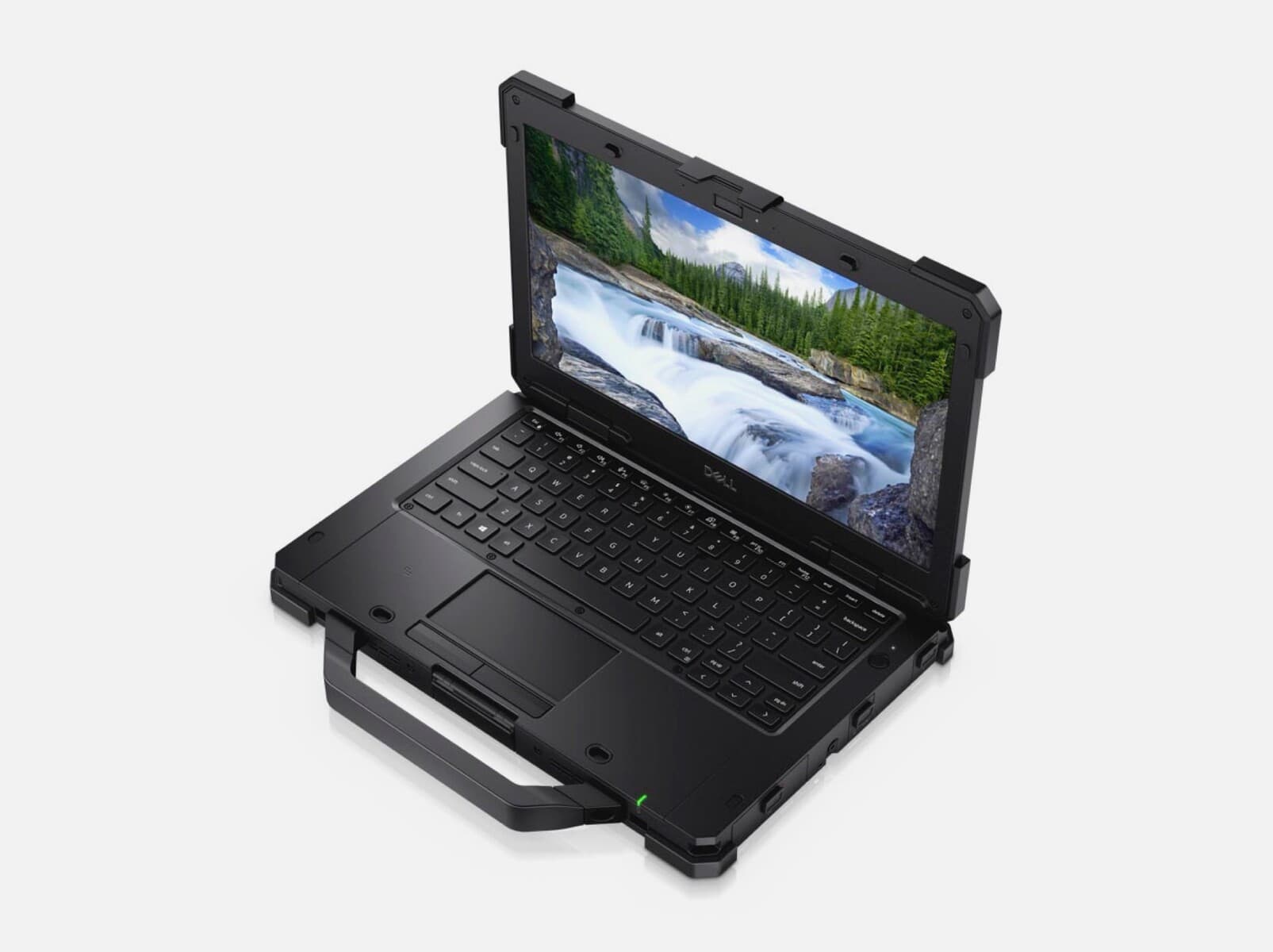
£3,000 – £5,000
The HP ZBook Fury 16 G11 is the market leader for maximum configurability and raw multi-core/graphics performance in a 16-inch class workstation, aimed at users who need workstation-class expandability and certified reliability. Against more portable choices such as the Dell Precision 5690 or Apple MacBook Pro, the Fury trades weight and battery longevity for higher sustained performance and easier on-site servicing—advantages that enterprise buyers value for lowering long-term total cost of ownership.
Show More Budget Mobile WorkstationsAlienware m18 R2 pairs Dell-level service, a bold industrial design and competent thermals with high-end parts, positioning it for buyers who want premium support and long-term reliability. Compared to the Razer Blade and Lenovo Legion, Alienware often costs more upfront but can reduce total cost of ownership through extended support and configuration options that benefit corporate or long-term users with undefined requirements.
Show More Premium Mobile WorkstationsWhy mobile workstations help professionals: evidence and plain-English takeaways
A range of peer-reviewed research, ergonomics studies and industry benchmarks supports the practical benefits of using mobile workstations for professional workloads. These findings cover productivity, health, durability and energy efficiency. Below are clear, beginner-friendly explanations of the main points that matter when choosing a mobile workstation.
Faster task completion: Independent benchmarks and time-and-motion studies show that higher CPU and GPU performance reduces completion times for computational and creative tasks, meaning teams can produce more work in less time.
Better image accuracy for creatives: Colour-accurate displays and factory calibration improve decision making in design and video work. Research in visual ergonomics indicates that accurate displays reduce rework and iteration cycles.
Ergonomics and hybrid working: Ergonomic studies highlight that portable setups combined with external docks, stands and quality input devices reduce musculoskeletal strain compared with ad hoc laptop use, improving comfort for all-day work.
Reliability and long-term cost: Hardware reliability tests and field reports show that workstation-class components, rigorous thermal testing and ISV certification reduce downtime and support predictable maintenance costs in professional environments.
Energy and battery tech: Advances in battery chemistry and power management, reported in engineering literature and vendor white papers, extend practical mobile use while balancing performance and thermal constraints for longer on-site use.
Connectivity and remote productivity: Research on remote work and network performance shows that built-in WWAN or 5G options, plus fast Wi-Fi 6E/7, maintain productivity in the field and reduce time lost to poor connections.
Frequently Asked Questions
Which laptop should I buy for creative rendering on-the-go?
Choose the ASUS ProArt Studiobook 16 OLED, with its 16-inch OLED display for high colour accuracy and GPU performance for content creation and rendering, rated 4.6.
What exact screen spec does the ASUS ProArt Studiobook 16 OLED include?
The ASUS ProArt Studiobook 16 OLED has a large 16-inch OLED display with high colour accuracy and a wide colour gamut, rated 4.6.
Which mobile workstation has the most power and expandability?
The HP ZBook Fury 16 G11 offers the most raw power and expandability here: Intel Core i9-14900HX CPUs, up to NVIDIA RTX 5000 Ada graphics, up to 128GB RAM and up to 16TB of storage, rated 4.5.
Is Dell Latitude 7330 Rugged Extreme suitable for field engineers?
Yes—the Dell Latitude 7330 Rugged Extreme has a fully rugged MIL‑STD/IP rated chassis, sunlight-readable display, and long-life swappable batteries, rated 4.6.
Conclusion
Whether you need a mobile workstation for heavy CAD, video production, machine learning or on-site engineering, the UK market in 2026 offers strong choices that balance power, portability and support. We hope this page helped you understand what to look for and find the right fit. If you want to refine results by budget, GPU type, display requirements or warranty, use the site search or filters to expand or narrow your options.