

Premium Colour Grading Workstations for UK Professionals: 2025 Selection Guide
Published on Saturday, 29 March 2025
Whether you're a post-production specialist in London, a freelance colourist working from home, or managing a broadcast facility, selecting the right colour grading workstation is crucial for delivering broadcast-quality results. Colour grading workstations represent a significant investment—typically ranging from £3,000 to £25,000—and the choice you make will directly impact your workflow efficiency, creative flexibility, and client satisfaction. The UK's thriving creative industry, from independent production companies to major broadcasters, demands workstations that can handle demanding colour science applications, real-time playback of 4K and 8K footage, and seamless integration with professional grading software like DaVinci Resolve, Baselight, and Nuke. Modern colour grading workstations combine powerful processors, ample RAM, specialised graphics acceleration, and calibrated monitoring systems to ensure your colour decisions translate accurately across all distribution platforms. This guide examines five leading systems currently available in the UK market, each offering distinct advantages for different professional scenarios—whether you prioritise raw processing power, software ecosystem compatibility, or budget-conscious value.
Top Picks Summary
Apple Mac Studio M2 Ultra
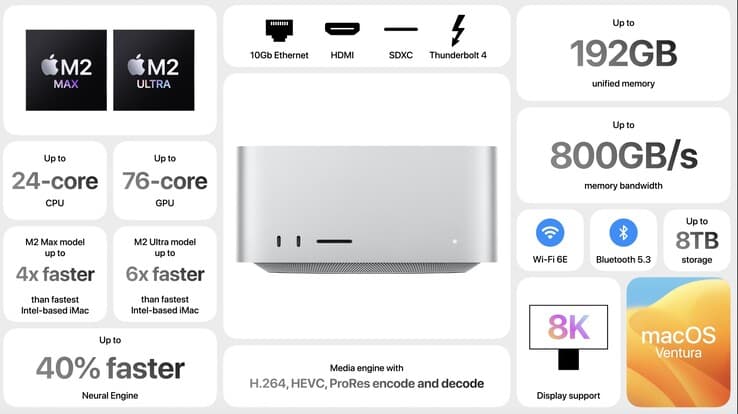
The Mac Studio M2 Ultra earns a best-in-class spot for colour grading workflows in the United Kingdom, 2025 thanks to macOS-optimized performance, a powerful unified memory architecture and exceptional hardware/software integration for apps like DaVinci Resolve and Final Cut. Compared with the heavier tower options in this list, it delivers a compact, lower-maintenance studio footprint and predictable thermal behaviour, making it a premium but cost-effective choice for boutique grading suites and freelancers prioritising turnaround and colour fidelity.
£3,500 – £6,500
HP Z8 Fury G5 Workstation
The HP Z8 Fury G5 stands out as the market leader for raw expandability and multi-GPU capability, aimed at high-end post houses in the UK that require massive VRAM, ECC memory and broad PCIe expansion for multi-node grading and batch renders. While larger and more power-hungry than the Mac Studio or ASUS PD5, its enterprise-grade service options and configurability deliver long-term technical and financial advantages for studios that need scalable, certified hardware for heavy Resolve timelines.

£4,000 – £15,000
Dell Precision 7960 Tower
The Dell Precision 7960 Tower strikes a strong balance between workstation reliability, ISV certification and thermal design, making it a pragmatic choice for UK colourists seeking a dependable, serviceable tower without the premium of HP's flagship. It offers competitive multi-core CPU and professional GPU options that close the performance gap to the Z8 Fury while often presenting a more attractive total cost of ownership and broader local support and financing options.

Lenovo ThinkStation P620
The Lenovo ThinkStation P620 is the world's first AMD Ryzen-based workstation, offering unmatched multi-threaded performance for professionals seeking high-efficiency computing. Its versatile system architecture supports advanced memory and graphics configurations, making it ideal for everything from 3D modeling to AI applications. The ThinkStation P620 also features a rugged design built to withstand intense usage while maintaining optimal cooling efficiency. With Lenovo’s commitment to quality and innovation, this workstation is a standout in the competitive market.

ASUS ProArt Station PD5
The ASUS ProArt Station PD5 is the value-oriented pick for independent colourists and small studios in the UK, delivering strong GPU performance in a compact chassis and a lower entry price compared with the Mac Studio and enterprise towers. Although it cannot match the extreme expandability of the HP or the macOS integration of Apple, its combination of sensible pricing, quiet operation and ISV-friendly components makes it an efficient, budget-conscious workstation for 2025 colour grading workflows.

These workstations deliver exceptional performance through custom-configured hardware, professional-grade graphics acceleration, and optimised operating systems. Each system includes multi-core processing capability, extensive RAM configurations supporting real-time effects processing, and colour-accurate display technologies essential for broadcast-standard deliverables.
Understanding Colour Grading Workstation Specifications
Professional colour grading demands specific hardware characteristics that distinguish workstations from standard desktop computers. Understanding these requirements helps ensure your investment delivers optimal performance.
Processor cores directly influence real-time playback capabilities and effects rendering speeds—typically 12 to 28 cores for professional workflows
RAM capacity of 64GB to 256GB enables handling multiple effects layers and maintaining responsiveness across colour correction tasks
Dedicated VRAM (12GB to 24GB) on graphics cards accelerates visual effects processing and timeline responsiveness
Colour-managed displays with factory calibration ensure accurate colour reproduction and consistent results across viewing environments
Storage architecture utilising fast SSD configurations for editing timelines and slower RAID systems for archival project files
Professional operating systems—Linux, macOS, or Windows with workstation-specific configurations—optimised for production workflows
Hardware acceleration support for industry-standard codecs including ProRes, DNxHD, and AMA-compatible formats
Expansion capabilities allowing future upgrades and integration with monitoring, reference grade displays, and external control surfaces
Frequently Asked Questions
Which colour grading workstation is best for macOS-optimized editing apps?
The Apple Mac Studio M2 Ultra is ideal for macOS-optimized apps like DaVinci Resolve, holding a 4.6 average rating and offering up to 192GB of unified memory.
How many double-wide GPUs does the HP Z8 Fury G5 support?
The HP Z8 Fury G5 supports up to four double-wide GPUs, paired with an Intel Xeon W-3400 processor featuring up to 56 cores.
What is the listing price for the Dell Precision 7960 Tower?
The Dell Precision 7960 Tower has a listing price of £5,239.58 GBPand offers ISV certifications for major VFX applications.
What storage capacity does the Apple Mac Studio M2 Ultra support?
The Apple Mac Studio M2 Ultra supports configurable ultra-fast SSDs up to 8TB alongside multiple Thunderbolt 4 ports and an HDMI output.
Conclusion
Selecting an appropriate colour grading workstation requires balancing your specific workflow requirements against your capital investment parameters. Each of the systems discussed offers proven reliability and industry-standard performance characteristics. Before committing to purchase, we recommend conducting a thorough assessment of your current software stack, anticipated project volumes, and expansion requirements over the next three to five years. Consider also the vendor's UK-based technical support infrastructure and warranty offerings, as these factors significantly influence total cost of ownership. Whether you're upgrading from consumer-grade equipment or establishing your first professional grading suite, investing in a quality workstation will substantially elevate your output quality and professional credibility. For additional technical specifications, pricing comparisons, or detailed performance benchmarks tailored to specific software applications, our comprehensive product database offers detailed filter options and expert recommendations based on your unique requirements.