Professional Drawing Tablets in the UK — Top 5 Picks for 2026

Published on Tuesday, 27 January 2026

Professional drawing tablets are purpose-built input devices that give illustrators, concept artists, animators and designers precise pen control, high pressure sensitivity and accurate colour rendering for digital creation. In the UK market, professionals prioritise low pen latency, reliable driver support, colour-accurate displays and robust warranty and service options, along with compatibility with software such as Adobe Creative Cloud and Affinity. Recent trends in 2026 include wider adoption of OLED and wide gamut displays, improved haptic feedback and tilt recognition, and growing interest in sustainability credentials and local support services. Buyers in the UK often balance performance against ongoing support and total cost of ownership, choosing models that match studio workflows, portability needs and ergonomics for long creative sessions.

Top Picks Summary

  1. Wacom Cintiq Pro 27
  2. XP-Pen Artist Pro 16 (Gen 2)
  3. Huion Kamvas Pro 24 (4K)
  4. Wacom Intuos Pro Large
  5. Xencelabs Pen Display 24
BEST FOR PREMIUM STUDIO

Wacom Cintiq Pro 27

Wacom Cintiq Pro 27

As the industry standard for professional drawing tablets, the Wacom Cintiq Pro 27 delivers best-in-class color accuracy, tilt and pressure sensitivity, and a large laminated 27-inch display that minimizes parallax. While it commands a premium versus the other options on this list, its unmatched pen performance, driver stability and studio-grade support make it the top choice for professionals who need uncompromised accuracy and long-term reliability.

4.7Rated 4.7 out of 5 stars
Wacom Cintiq Pro 27" Creative Pen Display - DTH271K1C | Mwave

Review Summary

94%

"Users praise the Cintiq Pro 27 for its industry‑leading color accuracy, large laminated 4K display and virtually lag‑free Pro Pen performance, calling it the go‑to choice for high‑end professional work; the main complaints are the steep price and occasional need for a powerful workstation to get the most out of it. "

BEST COMPACT PRO DISPLAY

XP-Pen Artist Pro 16 (Gen 2)

XP-Pen Artist Pro 16 (Gen 2)

The XP-Pen Artist Pro 16 (Gen 2) earns a market-leader spot for professionals seeking a portable, budget-friendly pen display within the professional drawing tablets category, offering strong color reproduction and responsive stylus performance. It undercuts premium models like Wacom on price while providing many of the essentials — solid tilt support and a compact footprint — making it a compelling value pick for freelancers and students who prioritize cost-effectiveness over the absolute top-tier tooling.
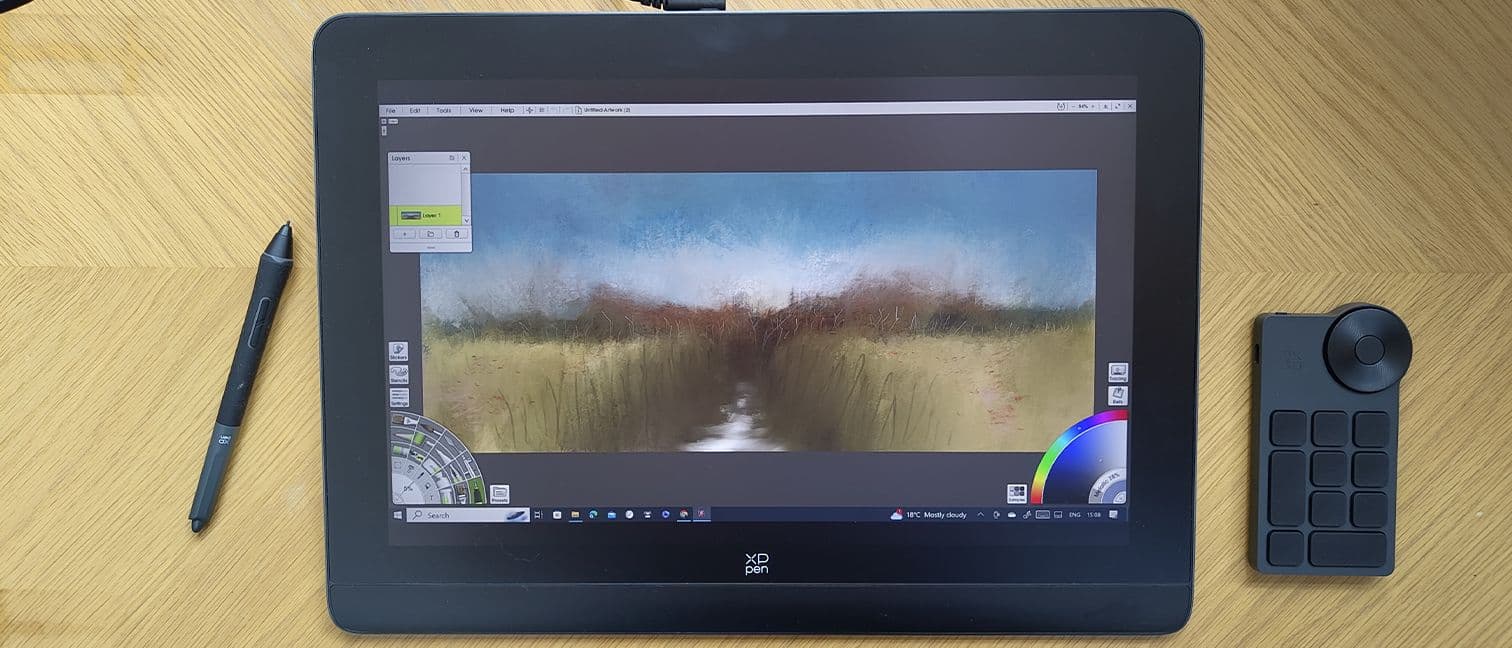
4.4Rated 4.4 out of 5 stars
Artist Pro 16 (Gen 2) | XPPen Canada Official Store

Review Summary

89%

"Owners appreciate the XP‑Pen Artist Pro 16 (Gen 2) for its excellent pen feel, solid color reproduction and strong value compared with flagship alternatives, though some users report intermittent driver quirks and limited stand/ergonomics. "

Reviews from the web

64 quotes · 9 sources · 2023–2025
  • The XPPen Artist Pro 16 (Gen 2) is a fantastic drawing tablet that offers a pen display with a high-spec for less than its rivals. The incredible 16K levels of pressure feel great to use, but also save on wear and tear.

    2023
  • XP-Pen has stepped up its efforts to push pen display technology, being the first to implement a stylus with a pressure sensitivity of 16K for an incredibly smooth drawing experience that doesn't break the bank.

    2024
  • The Artist Pro 16 (Gen 2) is a clear step up from the first-gen model, with a new X3 technology elevating what XP Pen’s range can do – a more sensitive stylus working on a higher-resolution screen for what should be a smoother, more enjoyable experience.

    2023
  • Either way, the customizable wireless keydial and premium and wildly accurate pen experience make this affordable tablet feel on the premium side, at least until you’re ready to spend the big bucks.

    2023
  • Just looking at the specs, the Artist Pro 16 Gen 2 is equipped to handle anything professional digital artists and designers can throw at it. The 2.5K resolution display with 99% sRGB color coverage ensures your work looks razor-sharp and color-accurate.

    2025Recent
  • My experience is echoed by countless online reviews. Users praise the tablet’s high resolution, accurate pressure sensitivity, and the overall drawing experience. Many have switched from other brands, highlighting the exceptional value for the price.

    · 2025Recent
  • And don’t forget the digital eraser at the end, which provides a realistic erasing experience and accelerates your creative process. The best part for us? There is no need for charging, so you can keep creating without any interruptions.

    2023

Loved

45
  • The tablet is framed in a light grey / silver metal and feels robust. Two USB-C ports connect to your laptop and power supply. There's an on/off switch that is easily accessed on the top left of the tablet and a second jogger for adjusting the display brightness.

    Creative Bloq
  • This carries through to the rear of the tablet, with two small rubber grips to keep it in place when in use; there are two more at the top of the XPPen Artist Pro 16 (Gen 2) to really keep it from moving when laid flat.

    Creative Bloq
  • The anti-glare surface works well; I've used the XPPen Artist Pro 16 (Gen 2) in direct sunlight and it remained workable, where some older drawing tablets haven't.

    Creative Bloq
  • As mentioned some budget drawing tablets lack everything you need out of the box, but the XPPen Artist Pro 16 (Gen 2) is different.

    Creative Bloq
  • The tablet's frame is metal and feels sturdy. The display sits inside a wide-ish bezel of around two-inches to enable you to lean onto the tablet nicely, a design idea replicated by the slightly large strip below the screen to enable you to rest your wrist and get a good...

    Creative Bloq
  • The Artist 16 Pro (2nd Gen) from XP-Pen is one of the best-packaged budget displays I've had the opportunity to go hands-on with.

    Windows Central
  • Balanced pen with 16K pressure sensitivity

    Windows Central
  • 2.5K 16-inch display is the 'sweet spot' for portability without sacrificing screen real estate

    Windows Central
  • The 16-inch pen display is widely considered the 'sweet spot' for artists who are looking for more screen real estate without sacrificing portability.

    Windows Central
  • But, of course, the screen is the main event, and what you’ll be mostly concerned with. The Artist Pro (Gen 2) comes with a 2560 x 1600 resolution, which is a decent improvement over the first-gen tablet’s 1920 x 1080 spec, with twice as many pixels and a taller 16:10 aspect...

    TechRadar
  • The screen is fully laminated and is said to be free of parallax – meaning the markings on the screen should precisely match the movements of your pen.

    TechRadar
  • + Built-in stand and keydial accessory

    TechRadar
  • + Roomy 2.5K display

    TechRadar
  • The Artist Pro 16 retails for just $599.99 / £529.99 / AU$609.99, which is an astonishing amount considering some of the high-tech features packed into this mid-range drawing tablet – particularly the 16,000 pressure levels in the stylus (included).

    TechRadar
  • Out of the box, the XPPen Artist Pro 16 Gen 2 arguably improved the design quality over their previous models with a sleek and minimalistic design.

    PetaPixel
  • The pen for the Artist Pro 16 (Gen 2) comes with a pretty sleek-looking metal enclosure to keep all the little accessories like spare nibs and the USB dongle for the keypad safe while traveling.

    PetaPixel
  • The case has a spring-loaded feel to get access to the inside of the case with the nib tool built right into the internal compartment, basically letting users treat the tool like a pen stand to remove and insert new nibs.

    PetaPixel
  • Moving away from built-in buttons and attached pen holders, the Gen 2 tablet adds a new (optionally) wireless shortcut remote that gives users 10 programmable buttons and a rotating jog dial where users can program a custom layout of their most frequently used keyboard...

    PetaPixel
  • The software allows for four “modes” per application should you choose to customize your most used applications and settings yourself, all of which are easily navigated using the Pen-Tablet application from XPPen.

    PetaPixel
  • In addition to the button customization, the software allows users to set their preferred rotation of the keypad as well, giving them a smoother editing experience regardless of being left or right-handed.

    PetaPixel
  • The display of the tablet gives users a nice 16:10 aspect ratio, 2560×1980 maximum resolution, and a 60Hz refresh rate with a working screen area of 13.57 inches x 8.48 inches making it a very comfortable working size for creatives to retouch or draw/illustrate on.

    PetaPixel
  • According to the company, this new and improved level of pen pressure sensitivity will address the technical issues found when working with other tablets – issues of lag, latency, instability, and disconnections when working with heavier (or extremely light) pen strokes.

    PetaPixel
  • This stylus is all about efficiency with its two shortcut keys that allow you to seamlessly switch between brush and eraser without having to touch the display. It’s a time-saver that enhances your workflow.

    JUST™ Creative
  • Despite its lightweight profile of just 16g, we can confidently say that this stylus is built to last. It’s perfect for long creative sessions, allowing you to draw comfortably with minimal hand fatigue.

    JUST™ Creative
  • The XPPen Artist Pro 16 Gen 2’s X-Nature Display is a real eye-catcher for us. It’s designed to make everything you see pop with vividness and accuracy.

    JUST™ Creative
  • From our personal experience, one thing we love about this Artist Pro Gen 2 is its new stylus, which is super sensitive. In fact, it has a 100% boost in pressure sensitivity, compared to the first-generation Artist Pro.

    JUST™ Creative
  • It’s also faster, with a response time that’s 1.5 times quicker, at just 90 milliseconds. We can attest that there’s almost no delay when we draw, making our strokes smooth and natural.

    JUST™ Creative
  • The accuracy is another big plus. It’s 20% more accurate than the older version, so your lines and details come out just how you want them.

    JUST™ Creative
  • What really wowed us is that there’s almost no lag. Our lines are clean and smooth, with no interruptions or jagged edges. This will surely give you confidence when you’re creating your art.

    JUST™ Creative
  • The advanced XPPen chip is not the only feature that sets the Artist Pro 16 (Gen 2) apart. The pen’s appearance provides a more comfortable and intuitive drawing experience.

    JUST™ Creative
  • The cone-shaped body stylus impressed us as it offers a balanced and comfortable grip. It even comes with a replaceable silica-gel grip, allowing you to customize it to your liking.

    JUST™ Creative
  • To keep you organized, it includes a practical pen case, ensuring that your tools are always at your fingertips. Plus, its sleek space gray color adds a touch of elegance to your workspace and lets you travel with style.

    JUST™ Creative
  • The ±60° of tilt sensitivity is another game-changer, recognizing the angle of the pen for natural shading techniques. As someone who often uses tilt with real pencils, this made sketching on the tablet much more intuitive.

    History Tools
  • The huge leap in pressure sensitivity to 16,384 levels (up from 8192) was immediately noticeable during my testing.

    History Tools
  • The heart of any great drawing tablet is of course the stylus, and the X3 Elite Plus does not disappoint. Developed in partnership with Wacom, it‘s one of the most advanced tablet pens on the market.

    History Tools
  • Despite the slim profile, the tablet feels rock-solid and well constructed, with no creaks or weak points. This is backed up by the upgraded 8H scratch-resistant screen and toughened glass, which should hold up well to daily use and travel.

    History Tools
  • The built-in adjustable stand is a small but welcome feature, letting you quickly prop the tablet up at a comfortable 20° angle for drawing. When not in use, it folds flat against the back, maintaining the sleek profile.

    History Tools
  • One of the standout features of the Artist Pro 16 Gen 2 is the gorgeous 2.5K (2560×1600) resolution display. That‘s a big step up from the typical 1920×1080 screens found on most 16" drawing tablets, even other "pro" models like the Huion Kamvas Pro 16 and XP-Pen‘s own...

    History Tools
  • In practice, the extra pixels make a huge difference. UI elements and text look incredibly crisp and defined. More importantly for artists, the higher pixel density means you can fit much more detail into your work before needing to zoom in, helping maintain a better sense...

    History Tools
  • The 99% sRGB / 90% AdobeRGB color coverage is equally impressive, and a big selling point for professional users. During my testing with a colorimeter, I measured an actual 99.6% sRGB and 91.4% AdobeRGB – slightly beating XP-Pen‘s claims.

    History Tools
  • The 220 nits of brightness won‘t break any records, but it‘s still a 10% increase over the previous Artist Pro 16 and perfectly usable under normal indoor lighting. I had no trouble seeing details clearly even in a brightly lit room.

    History Tools
  • One unique aspect of the display is the full lamination and optical bonding technology. By eliminating the air gap between the screen layers, it virtually eliminates parallax and provides a more natural "pen-on-paper" feel as you draw.

    History Tools
  • The first thing you notice about the Artist Pro 16 Gen 2 is the refined, minimalist design. The all-black aluminum alloy chassis looks and feels incredibly sleek and professional.

    History Tools
  • The included pen stand is a nice premium touch too. Made of aluminum just like the tablet itself, it provides a sleek and secure place to store the stylus and spare nibs when not in use.

    History Tools
  • I also appreciate that the stylus is completely battery-free, so it‘s lightweight and you never have to worry about charging it. The two programmable shortcut buttons on the pen came in handy as well, letting me quickly access undo/redo or my eraser tool without breaking my flow.

    History Tools

Criticised

11
  • The onboarding includes guiding you through setting up and calibrating the pen stylus as well as the X-Remote Controller, and you can come back at any time to adjust the settings and fiddle.

    Creative Bloq
  • The bundle isn't as comprehensive as the excellent Xencelabs Pen Tablet Medium Bundle that also includes items like a protective case, but honestly, there's very little the XPPen Artist Pro 16 (Gen 2) doesn't come packaged with; the only downside being a lack of a USB-C to...

    Creative Bloq
  • Not a 4K display

    Windows Central
  • Included quick key remote feels flimsy and cheap

    Windows Central
  • Does not include an adjustable stand or VESA mount support

    Windows Central
  • What's not included is the 3-to-1 cable with HDMI, USB-A and USB-C. If your computer does not have USB-C for video, and you use HDMI for video, you will need that 3-to-1 cable which cost USD 19.99. This cable may be included as a free gift during promotion.

    parkablogs.com
  • There are two kickstands at the back, integrated into the overall body of the display, which prop up the screen at a 19-degree angle.

    TechRadar
  • Fixed angle for stand

    TechRadar
  • Beneath the screen, you’ll find a wrist support, which doesn’t have the cushioning of an equivalent mousepad but still assists with ergonomics. That said, it doesn’t exactly do much when you’re drawing on the upper half of the screen, given its overall size.

    TechRadar
  • While on the topic of the matte-finished screen, while the impact is next to nothing, it’s worth noting that there is a little bit of what I’d call a “film grain” effect on the resolution of your image.

    PetaPixel
  • If I had one critique, it‘s that at 1.2 kg (2.65 lbs), the Artist Pro 16 Gen 2 is not the lightest 16" tablet out there.

    History Tools

Buyer voices

1
  • Should I buy a Artist pro 16(2nd gen)?Looking for Advice/Info (self.XPpen)

    reddit
BEST LARGE 4K DISPLAY

Huion Kamvas Pro 24 (4K)

Huion Kamvas Pro 24 (4K)

Huion's Kamvas Pro 24 (4K) stands out in the professional drawing tablets field by pairing a large, pixel-dense 24-inch 4K IPS panel with accurate color coverage at a significantly lower price than comparable flagship displays. For professionals needing expansive, high-resolution canvas space for detailed illustration or texture work, it balances technical capability and cost, though its driver ecosystem and accessory support are still catching up to Wacom's mature platform.

4.4Rated 4.4 out of 5 stars
Kamvas Pro 24 (4K) Pen Display - HUION

Review Summary

90%

"The Huion Kamvas Pro 24 (4K) is widely liked for delivering a large, sharp 4K display and responsive pen at a much lower price than competing pro models; reviewers note very good color out of the box but mention occasional driver/compatibility headaches. "

BEST PEN TABLET (NON-DISPLAY)

Wacom Intuos Pro Large

Wacom Intuos Pro Large

The Wacom Intuos Pro Large remains the best-in-class non-display option among professional drawing tablets thanks to its highly responsive Pro Pen, customizable ExpressKeys and rock-solid drivers that studios rely on for precision workflows. It is more affordable than a Cintiq display and offers superior ergonomics for artists who prefer drawing on a surface rather than a screen, but it forgoes on-screen feedback that pen displays in this list provide.

4.7Rated 4.7 out of 5 stars
Wacom Intuos Pro Large Drawing Tablet – NCS Sales and Services Sdn Bhd

Review Summary

94%

"The Wacom Intuos Pro Large is consistently praised for its best‑in‑class pen precision, durable build and reliable drivers, making it a favorite for professional illustrators and retouchers, with critiques mainly around its premium price and occasional desire for more modern connectivity. "

BEST WACOM ALTERNATIVE

Xencelabs Pen Display 24

Xencelabs Pen Display 24

The Xencelabs Pen Display 24 is a market-leading challenger in the professional drawing tablets segment, offering ergonomic pen hardware, a clean driver experience and thoughtful shortcut controls at a price that competes with larger Wacom and Huion displays. It differentiates itself by prioritizing intuitive workflow features and a simplified accessory package, making it attractive to professionals who want near-Wacom performance without the highest premium, though its ecosystem and third-party integrations are still maturing.

4.5Rated 4.5 out of 5 stars
Xencelabs Pen Display 24 Large Digital Drawing Screen XEN-XMPD24US

Review Summary

91%

"Xencelabs' Pen Display 24 receives strong marks for excellent color, a very natural pen experience and thoughtful accessory/shortcut options, with reviewers noting it's a compelling alternative to Wacom but sometimes hampered by early software polish and driver updates. "

How to Choose

Why drawing tablets help professionals: research and practical benefits

A range of human computer interaction and ergonomics studies shows that pen-based input delivers advantages over traditional mouse input for drawing, note taking and detailed editing tasks. Research highlights improved motor control, greater naturalness for freehand drawing, and faster transfer of sketch concepts into digital form, which can speed up creative workflows. Ergonomics research also points to reduced awkward wrist posture when stylus use is combined with appropriate tablet positioning and regular micro-breaks.

Precision and control: Studies in HCI find that stylus input produces finer stroke control and better pressure gradation than a mouse for drawing tasks, improving line quality and responsiveness.

Faster concept iteration: Experimental work indicates that artists can iterate visual ideas more quickly with pen input because the hand motion matches traditional drawing techniques.

Ergonomics and strain: Research on posture and repetitive strain suggests that using a stylus with proper setup can reduce shoulder and wrist strain compared to extended mouse use, though ergonomics practices remain essential.

Learning and cognitive benefits: Educational studies show that sketching with a pen supports spatial reasoning and memory in visual learners, making pen tablets valuable for teaching design and illustration.

Display and colour science: Advances in display technology and colour calibration methods are documented in imaging studies, helping professionals rely on tablet displays for accurate colour-critical work when properly profiled.

Frequently Asked Questions

Should I choose Wacom Cintiq Pro 27 for pro illustration?

Choose the Wacom Cintiq Pro 27 if you want a large 27-inch 4K colour-accurate display plus a Pro Pen with near-zero latency, tilt support and 8192 pressure levels; it’s rated 4.7.

What pressure and tilt specs does XP-Pen Artist Pro 16 support?

The XP-Pen Artist Pro 16 (Gen 2) uses a battery-free pen with tilt support and 8192 pressure levels, plus a 16-inch high-resolution factory-calibrated display for detailed work.

Which tablet gives the most value: Huion Kamvas Pro 24 (4K)?

Huion Kamvas Pro 24 (4K) pairs a 24-inch 4K laminated display with strong colour accuracy at a significantly lower price than comparable flagship displays; it’s rated 4.4.

Is the Huion Kamvas Pro 24 (4K) good for studio setups?

Yes—the Huion Kamvas Pro 24 (4K) includes USB-C/HDMI connectivity and an adjustable stand, with a 24-inch 4K laminated display to reduce parallax; it’s rated 4.4.

Conclusion

Professional drawing tablets remain a cornerstone tool for UK creatives and studios in 2026. We hope this overview helped you understand what to look for; if you did not find the exact model you want here, use the search or filters to refine by features such as display size, pen latency, compatibility and warranty to find the best fit for your workflow.

Don't see your product here?

If you're a brand owner wondering why your product isn't listed, we can help you understand our ranking criteria.

Learn why

As an Amazon Associate and affiliate partner, InceptionAi earns from qualifying purchases. This does not influence our rankings. Our product search and market analysis are separate from the selling part.